|
|
Topic Originator: DBA
Date: Sun 19 Oct 00:20
With the latest Android update release, using the Android "back" arrow function closes the app rather than returning to the previous menu.
For example, if I`m in a thread, previously the Android "back" function took me back to the list of threads. Now, it closes the app.
Hopefully it can be resolved as it`s a wee bit of a pain!
|
|
|
|
|
|
Topic Originator: ipswichpar
Date: Sun 19 Oct 06:21
Still working ok for me.
|
|
|
|
|
|
Topic Originator: jake89
Date: Sun 19 Oct 08:28
I found that when I moved to Android 16 the swipe back now has to be done closer to the middle rather than from the edge like on other apps. If I swipe from the edge it closes the app. Weirdly, this DOESN`T happen when going back from drafting a post.
|
|
|
|
|
|
Topic Originator: buffy
Date: Sun 19 Oct 10:15
Better posting this on the admin forum as Milos might not see it here. I’ll give him a nod however.
”Buffy’s Buns are the finest in Fife”, J. Spence 2019”
|
|
|
|
|
|
Topic Originator: StevenPar77
Date: Sun 19 Oct 11:31
I genuinely thought it was just me having this issue when I had the most recent software update. Predictive text had gone too but managed to restore it.
The back button closing the app is frustrating when you have been used to it just going to the previous page for so long.
|
|
|
|
|
|
Topic Originator: Milos Drizzle
Date: Sun 19 Oct 12:58
I’ve just posted this on the admin forum:
“Hello, this is a “feature” introduced by Google, i.e. you can now close an app by swiping right from the far left of the screen. This unfortunately interferes with the .net app. I investigated this a few weeks back, and there’s no way for me to override this behaviour (perhaps understandably). Maybe Google have since introduced a way to disable it in Settings? But the only definite way round it is to get used to start your side-swipe from slightly further in from the left side, and it won’t trigger Androids close-app thang. “
ETA you can still use the back button in the action bar (not as nice as side-swipe). I’m wondering if I should maybe add, say, a double-tap to go back, which isn’t as intuitive as a side-swipe, but would give an alternative that doesn’t involve reaching up to the action bar. The best answer though is simply to find the point from which you can side-swipe without closing the app and committing it to muscle-memory!
This is my signature
Post Edited (Sun 19 Oct 13:02)
|
|
|
|
|
|
Topic Originator: Milos Drizzle
Date: Sun 19 Oct 15:03
I`ve just realised there`s a point-release update of Android - let me check that out on the simulator - hopefully replicate the issue with the back button.
This is my signature
|
|
|
|
|
|
Topic Originator: Milos Drizzle
Date: Sun 19 Oct 15:23
Can folks confirm what is causing the app to close? Is it the left-to-right side swipe starting from the far left of the screen, or is it tapping the back arrow at the top-left of the screen? The latter is working fine on the simulator with very latest Android release, and I also don`t see any crash reports relating to it.
This is my signature
|
|
|
|
|
|
Topic Originator: jake89
Date: Sun 19 Oct 16:14
On mine (Pixel 7a), the typical back action is to swipe from the left edge into the middle. That`s how it used to work on the app. Now you need to swipe from the middle instead, except when drafting a message. If you swipe from the left when reading posts it will close the app.
|
|
|
|
|
|
Topic Originator: Milos Drizzle
Date: Sun 19 Oct 16:37
Jake, I take it tapping the back arrow at the top-left takes you back fine also?
This is my signature
|
|
|
|
|
|
Topic Originator: StevenPar77
Date: Sun 19 Oct 17:35
The swipe from the left and the back arrow at the top left both work absolutely fine.
It might be a case of getting out of old habits as I always used the back triangle on the phone at the bottom right if that makes sense?!
First world problem though!
|
|
|
|
|
|
Topic Originator: TAFKA_Super_Petrie
Date: Sun 19 Oct 18:07
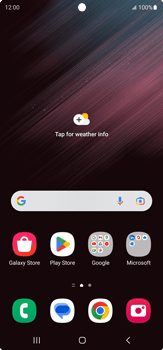
It`s the native back button arrow in bottom right hand corner that no longer goes back and just closes the app now.
Used a stock photo of an S23 as example
---------------------------------------------------------------

"People always talk about Ronaldinho and magic, but I didn't see him today. I saw Henrik Larsson; that's where the magic was."
Post Edited (Sun 19 Oct 18:08)
|
|
|
|
|
|
Topic Originator: Milos Drizzle
Date: Sun 19 Oct 18:18
Ah, noted Tafka, I’ll check that on the simulator.
This is my signature
|
|
|
|
|
|
Topic Originator: Milos Drizzle
Date: Sun 19 Oct 20:13
It turns out that they`ve changed how you handle presses of the hardware back button on the latest Android OS. I`ve submitted an update (v5.92) to Google to get it working as before on the latest Android OS - not sure how long they take to get approved now, but hopefully be available tomorrow.
This is my signature
|
|
|
|
|
|
Topic Originator: Milos Drizzle
Date: Sun 19 Oct 20:38
Looks like the update is publicly available now - V5.92.
This is my signature
|
|
|
|
|
|
Topic Originator: Sammy_Must_Die
Date: Sun 19 Oct 20:44
Quote:
Milos Drizzle, Sun 19 Oct 20:38
Looks like the update is publicly available now - V5.92.
Wonderful... update downloaded and working perfectly. Thanks

|
|
|
|
|
|
Topic Originator: TAFKA_Super_Petrie
Date: Sun 19 Oct 21:59
All good here too, appreciate it.
---------------------------------------------------------------
"People always talk about Ronaldinho and magic, but I didn't see him today. I saw Henrik Larsson; that's where the magic was."
|
|
|
|
|
|
Topic Originator: Milos Drizzle
Date: Sun 19 Oct 22:02
Good stuff.
This is my signature
|
|
|
|
|
|
Topic Originator: rikaka
Date: Mon 20 Oct 07:29
Back to how it was, amazing thanks!
|
|
|
|
|
|
Topic Originator: LochgellyAlbert
Date: Mon 20 Oct 08:33
Was annoying , but now back to normal, good work!👍😎
|
|
|
|
|
|
Topic Originator: jake89
Date: Mon 20 Oct 08:46
Confirm it`s working fine on my Pixel too. Cheer Milos!
|
|
|
|
|
|
Topic Originator: Milos Drizzle
Date: Mon 20 Oct 12:25
Cheers for confirming 👍
This is my signature
|
|
|
|
|
|


